
Seal FLORIDA TECH GUIDE
OFFICIAL RESIDENT DEFENSE RESOURCE
2026 Edition • Senior Tech Defense Series

The 5-Step Apple Device Scam & Privacy Defense Checklist

The Practical, Jargon-Free Playbook for Protecting Your Apple Devices, Passwords, and Financial Peace of Mind

Curated specifically for active adults, retirees, and luxury community residents in Boca Raton, Delray Beach, Highland Beach, Fort Lauderdale, and Coastal South Florida.
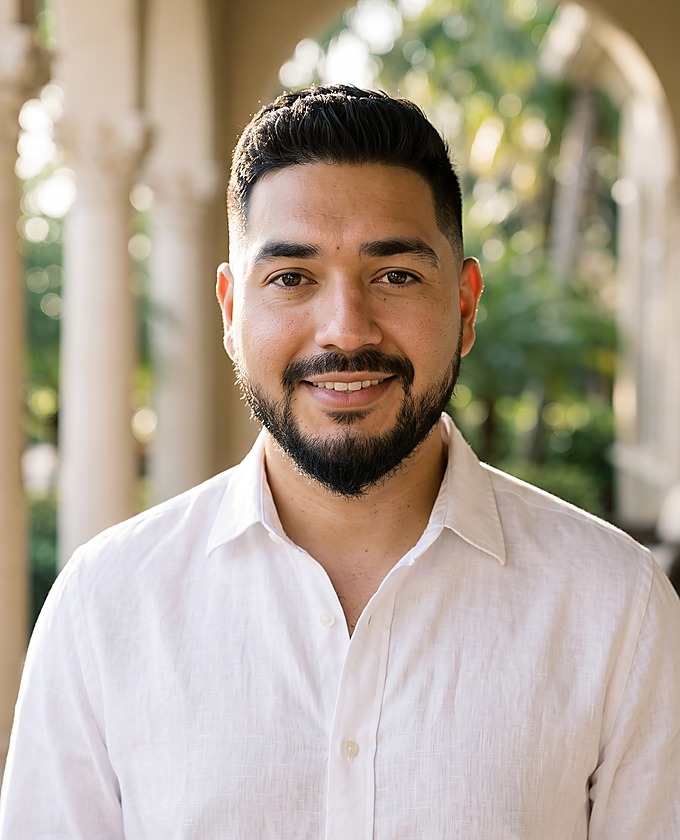
Jay
Jay
Founder & Tech Concierge
✓ FDLE Level 2 Cleared FBI Live-Scan Biometric Screening (F.S. § 1012.465)

Welcome from the Founder

Dear Neighbor,

If you have ever felt your stomach drop because an alarming red alert covered your iPad screen, or received a frantic text claiming your bank accounts were frozen, please know two things immediately:

1. You are not alone. South Florida is the #1 targeted region for digital fraud in America. Scammers target our communities because our residents have built substantial life savings, own modern Apple devices, and are generous, trusting individuals.
2. Falling for a scam has nothing to do with "being bad at computers." Modern scams are not technical puzzles; they are engineered psychological traps exploiting fear and urgency.

My background is in enterprise cybersecurity and school district infrastructure. For years, I watched big-box retail stores treat older adults with impatience and condescending jargon. I founded Florida Tech Guide to provide an unhurried, white-glove alternative: a trusted personal concierge who comes to your kitchen table with patience, respect, and zero judgment.

Keep this 5-page guide beside your desk, follow these 5 steps, and share it with your neighbors.

Warmest regards,
Jay • Founder & Principal Concierge | (561) 527-1069 | floridatechguide.com
Seal FLORIDA TECH GUIDE
STEP 1: SCAM RECOGNITION

The Top 5 Digital Scams Operating in South Florida

Scammers do not hack your Apple hardware; they hack your emotions. Here are the five active schemes operating across South Florida and the 3-second rule to disarm each one.

1
The "Urgent Bank Wire / Zelle Fraud Alert" High Danger
The Bait: SMS: "CHASE FRAUD: Did you send $1,850 via Zelle to Michael S.? If NO, tap immediately: chase-verify-secure.net"
The Trap: Tapping leads to a counterfeit banking screen that captures your login and drains your savings.
The 3-Second Defense: Never tap links in SMS messages. Close the message. Flip your plastic debit/credit card over and dial the 1-800 number printed on the back. Real banks never text login links.
2
The "Imposter Grandchild" or Family Emergency Psychological Fraud
The Bait: Frantic call: "Grandma! I was in a car crash in Daytona. Police need bail cash now, don't tell Mom!"
The Trap: Scammers use 5-second AI voice clips from social media. A fake "attorney" demands wires or couriers.
The 3-Second Defense: Hang up and call your grandchild on their known cell phone. Establish a private "Family Code Word." Anyone demanding Apple Gift Cards or cash couriers is 100% a criminal.
3
The Full-Screen "Apple Virus Warning" Browser Lockout Screen Takeover
The Bait: Screen turns red, sirens sound: "CRITICAL ALERT: Apple Security detected Trojan Spyware. Call 1-800-459-XXXX."
The Trap: Overseas operators demand remote access (AnyDesk/TeamViewer), hold files hostage, and bill thousands.
The 3-Second Defense: Apple NEVER puts phone numbers on browser popups. Do not call. On iPad/iPhone, swipe up to Home. On Mac, press Command + Option + Escape and Force Quit Safari.
4
Spoofed Apple ID & iCloud Security Emails Credential Theft
The Bait: Official email: "Your Apple ID has been suspended due to unauthorized logins from Moscow. Verify in 24 hours."
The Trap: The link mimics Apple's login to steal your master Apple ID password and payment card on file.
The 3-Second Defense: Check the sender email. Legitimate Apple notices come ONLY from @apple.com. Never click email links; navigate directly to appleid.apple.com in Safari.
5
Fraudulent SunPass / Florida Toll Text Messages Identity Phishing
The Bait: SMS: "SunPass: Outstanding toll violation of $4.15 on Turnpike. Avoid $50 late fine: settle-sunpass-fl.com"
The Trap: The small balance lowers your guard, leading you to submit your full name, card number, and address.
The 3-Second Defense: FDOT and SunPass NEVER send toll payment links via SMS text. Delete the message immediately and report as junk. Check official tolls on sunpass.com.
Seal FLORIDA TECH GUIDE
STEPS 2 & 3: CREDENTIAL ARMOR

The Password & Two-Factor (2FA) Survival Guide

How to retire the paper spiral notebook, eliminate forgotten password frustration, and lock out fraudsters permanently.

✕ Why the "Paper Notebook" Method Fails
  • The Versioning Trap: You write down Boca2024!. A site demands a reset 90 days later. You scribble Boca2024# above it. Soon you have 5 crossed-out passwords and no idea which works.
  • Physical Vulnerability: A notebook left beside a desk is easily viewed or misplaced by visiting contractors, vendors, or cleaning staff.
  • No Autofill: Forcing you to manually hunt and peck 14 random symbols on a glass iPad screen every time you pay an electric bill.
✓ The Modern Solution: Apple Keychain & Face ID
  • Encrypted Vault: Apple securely remembers your logins inside a hardware-encrypted vault protected by government-grade security.
  • Instant Autofill: When you open a website, your iPad/iPhone scans your face (Face ID) or finger (Touch ID) and fills the password automatically.
  • Where to Find It: Open Settings ➔ Passwords. Every account is neatly alphabetized and searchable with one tap.
Golden Rule of 2FA NEVER READ A 6-DIGIT CODE OVER THE PHONE
Two-Factor Authentication (2FA) is like a bank safe deposit box with two keys: Key #1 is your password; Key #2 is your physical iPhone receiving a 6-digit code. Scammers call claiming to be your bank: "I'm sending a code to verify your identity; please read it to me." The moment you read that code, you handed them the key to drain your accounts. Real banks will NEVER ask you to verbalize an SMS passcode out loud.

3 Immediate Action Steps to End Password Lockouts:

1. Turn On iCloud Keychain
Settings ➔ [Your Name] ➔ iCloud ➔ Passwords & Keychain ➔ ON
Safely syncs complex passwords across your iPhone, iPad, and Mac with automatic Face ID fill.
2. Add Recovery Contact
Settings ➔ [Your Name] ➔ Sign-In & Security ➔ Account Recovery
Assign a trusted adult child or spouse so you never get permanently locked out of your Apple ID.
3. Audit Breached Logins
Settings ➔ Passwords ➔ Security Recommendations
Apple alerts you to compromised website logins and helps you replace them with strong passwords.
Seal FLORIDA TECH GUIDE
STEP 4: MEMORY PROTECTION

Keeping Family Photos Safe: iCloud vs. Device Storage

The most heartbreaking call we receive: "I got a new iPhone at the carrier store, and ten years of grandchildren photos disappeared." Here is how to ensure your memories are permanently protected.

📦 DEVICE STORAGE
Analogy: The Trunk of Your Car

This is the physical microchip soldered inside your iPhone or iPad (e.g., 64 GB or 128 GB). It holds the files you are carrying today.

The Risk: If your iPad falls into a swimming pool or is lost, everything inside the car trunk is destroyed—unless an off-site copy exists in the vault.

☁️ iCLOUD STORAGE
Analogy: The Off-Site Safe Deposit Box

This is secure, encrypted storage hosted on Apple’s hardened server vaults. It acts as an automatic, continuous safety net.

The Protection: Every night when your device is plugged in and on Wi-Fi, a carbon copy of every photo, note, and contact is uploaded. If your device breaks, your memories restore instantly.

⚠️ The 3 Red Flags That Your Backup Safety Net Is Broken

1
Check "Last Successful Backup" Date: Open Settings ➔ [Your Name] ➔ iCloud ➔ iCloud Backup. Look at the date beneath "Back Up Now". If it says "Never", "2 weeks ago", or "Failed", your photos are unprotected! Tap "Back Up Now" immediately.
2
The "iCloud Storage Almost Full" Warning: Apple provides 5 GB free. This fills up in a few months. Once full, iCloud completely halts all backups. Upgrading to Apple’s 50 GB tier is $0.99 / month—the cheapest insurance policy in the world for family memories.
3
Turn On "Optimize iPhone Storage": If your device says "Storage Full" and refuses to take new photos, open Settings ➔ Photos ➔ check "Optimize iPhone Storage". Master originals stay safe in iCloud while space-saving copies stay on your phone.
Resident 60-Second Memory Audit Checklist:
Checked "Last Backup" date in Settings
Verified iCloud Photos toggle is ON
Upgraded to 50 GB ($0.99/mo) if 5 GB full
Seal FLORIDA TECH GUIDE
STEP 5: YOUR PERSONAL IN-HOME ALLY

The In-Home Tech Concierge Standard

Unhurried, patient, white-glove technical support delivered directly to your kitchen table.

✓ State-Certified Level 2 FDLE/FBI Cleared

Screened under Florida Jessica Lunsford Act standards (F.S. § 1012.465) with complete biometric clearance. Welcome Jay into your home with total peace of mind.

✓ Patient & 100% Jargon-Free

We never touch your keyboard without explaining every action in plain English. We leave customized written instructions before walking out the door.

✓ Dedicated Owner-Operated Continuity

You work directly with Jay every single visit. No rotating subcontractors, no impersonal call centers, and no corporate runarounds.

✓ Strict Privacy & Total Discretion

Zero password retention. Complete non-disclosure and client confidentiality trusted by active adults across South Florida's premier communities.

Concierge Service Rate What Is Included
In-Home Hourly Support $90 / hr (1-hr min) Patient troubleshooting, Wi-Fi optimization, printer fixes, Apple TV/smart home setup, and 1-on-1 personalized lessons.
New Device Setup & Migration $199 flat White-glove unboxing, seamless transfer of all photos, contacts, email, and apps, and secure wiping of old hardware for trade-in.
Digital Spring Cleaning & Audit $149 flat Full scam/malware cleanup, iCloud backup audit, password consolidation, and two-factor safety lockdown.
OFFICIAL RESIDENT CONCIERGE VOUCHER SAVE $25.00
$25 OFF YOUR FIRST IN-HOME CONCIERGE VISIT
Or receive a complimentary 30-minute new device unboxing consultation with any migration package.
PROMO VOUCHER CODE:
SCAMDEFENSE2026
DIRECT BOOKING LINE:
(561) 527-1069
Valid for new clients in Palm Beach and Broward counties. One voucher per household. Simply mention code SCAMDEFENSE2026 when calling, texting, or booking online at floridatechguide.com.
Ready for Technology Peace of Mind? Book an unhurried, patient in-home session with Jay today.
(561) 527-1069
[email protected] • floridatechguide.com